

Losing access to your League of Legends account may be stressful, but fixing it is actually not as bad as it may seem. That’s because Riot makes it quick and painless to change your password by providing multiple secure reset options, allowing you to jump right back into the Rift without missing a beat. By the end of this guide, you’ll know how to change your password in League of Legends, from inside the client and out.
Note: Your Riot Account is shared across all Riot Games titles. This means that if you change your password for League of Legends, it will automatically update it for VALORANT, Teamfight Tactics, and any other Riot services linked to your account.
How To Change Your Password In League of Legends
There are three official ways to change or reset your League of Legends password: via the Riot Account Management page, through the Riot Recovery page, or directly on the Riot Client app.
Whichever method you use, you’ll need to have access to your account email and/or your existing login credentials. That way, you’ll be able to change your League of Legends password even if you’re locked out or unable to access your account.
All changes are handled outside the in-game environment, either on the official Riot Games websites or via the Riot Client app, making them safe and secure to use. Plus, it only takes a few minutes to complete, meaning you’ll be back in Summoner’s Rift in no time.
Step-By-Step Guide To Changing Or Resetting Your Password
Whether you’re logged in or not, it’s super easy to change your League of Legends password. Simply follow the step-by-step instructions below.
Using The Recovery Website
You can use the Riot Account Recovery website to reset your password if you’ve lost or forgotten it. This method is entirely web-based, meaning you don’t have to log in to the Riot Client app.
- Open your web browser.
- Go to the Riot Recovery website at https://recovery.riotgames.com/en.
- Select the “Forgot Password?” option.
- Enter the username and select the server associated with your League of Legends account (i.e., the one that you use to sign in).
- Complete the CAPTCHA.
- If your username matches an existing account, you’ll receive a password reset email within a few minutes. If you don’t see it, look in your junk or spam folders, or contact Support.
- Click the link in the email and follow the instructions to create and confirm a new League
Your new password will take effect immediately, allowing you to log in through the Riot Client or website.

Using The Riot Client
You can also change your password in League directly from the Riot Client app. However, the process is different, depending on whether you’re logged in or not.
If Not Logged In
- Open the Riot Client.
- Select the “Sign In” tab at the login screen.
- Click on “Can’t Sign In?” at the bottom of the window.
- Your browser will open and redirect you to the Riot Recovery page.
- Follow the same password-reset steps described in the previous section.
This method works best if you’re at the login screen and can’t access your account.

If Already Logged In
- Open the Riot Client.
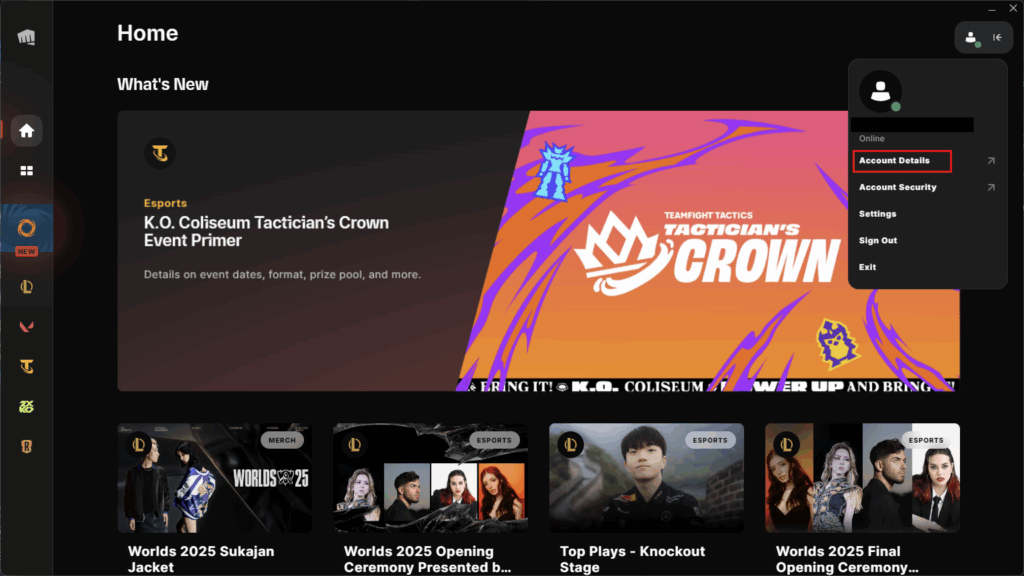
- Click your avatar icon in the top-right corner of the window.
- Select the “Account Details” option.
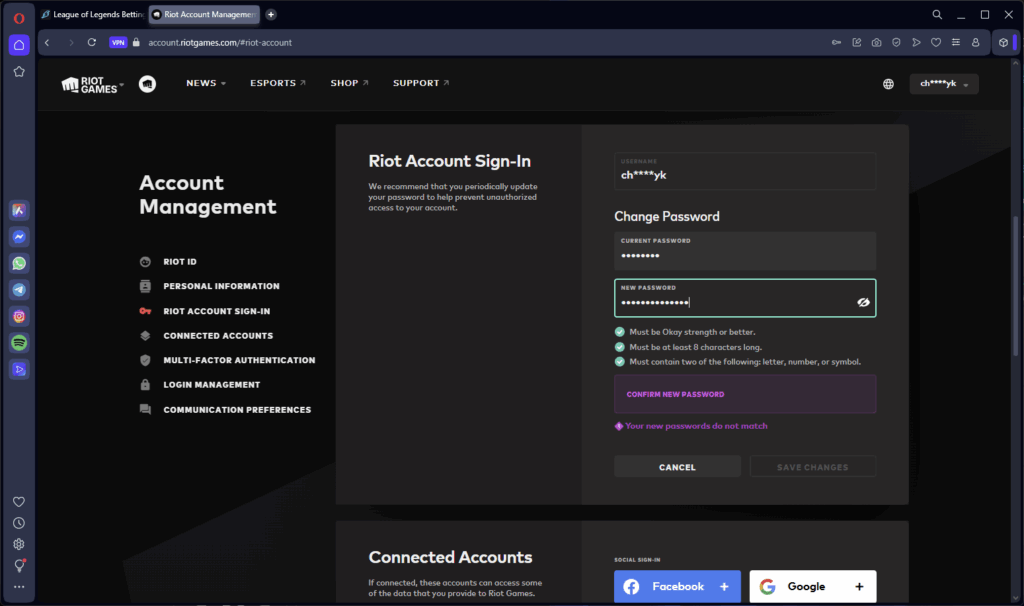
- On the left-hand menu, select “Riot Account Sign-In”.
- Enter your current password, followed by your new password, and confirm to save.
This change happens instantly and doesn’t require email confirmation, which means you can continue playing League without any interruption.
Using The Riot Account Website
- Visit https://account.riotgames.com.
- Log in with your account details.
- Enter the sign-in code sent to your registered email inbox (if you have 2FA enabled).
- On the left-hand menu, select “Riot Account Sign-In”.
- Enter your current password, your new password, and confirm it.
- Save the changes.
Your password will update instantly. This method is ideal for when you don’t want to open the Riot Client or aren’t currently at your PC.
Frequently Asked Questions About Changing League of Legends Passwords
If you run into problems resetting your password, these frequently asked questions (FAQs) should clear up any misunderstandings.
Why Haven’t I Received My Password Reset Email?
If you haven’t received your password reset email, check your spam or junk mail folders. Also, make sure you entered the correct username and email linked to your Riot Account. If that doesn’t work, resubmit the request or contact the Riot Support team for assistance.
Can I Change My Password Without Access To My Email?
No. Unfortunately, it’s not possible to change your Riot Account password if you cannot access your registered email account. Riot uses your email as verification that you own the account to prevent any unauthorized changes.
Where Can I Find The Account Settings In The Riot Client?
It’s not immediately visible. Once you log in to the Riot Client, click on your avatar icon in the top-right corner and select “Account Details.” You’ll be directed to the Riot Account Management page, where you can view and change any settings related to your profile.
What Should I Do If I Forgot My Username As Well?
If you don’t know your username, you can visit the Riot Recovery page and select “Forgot Username?” to request a reminder be sent to your linked email address. Once you have it, you can reset your password by following the steps outlined in this guide.
Can I Change My Password While Logged Into The Client?
Yes. Open the Riot Client, go to Account Details → Riot Account Sign-In → enter your current and new passwords. Your password will be updated instantly, without any email confirmation.
Is It Possible To Reset My Password Directly In-Game?
No. You cannot change or reset your password from inside League of Legends or any Riot game. It can only be performed via the Riot Client app or on the Riot Account website.
How Long Does It Take For A New Password To Take Effect?
When you change your League of Legends password, the new password will become active immediately across all Riot-linked games and services. You’ll no longer be able to use the old password.
Always practice Responsible Gambling and check out our latest promo offers and boosts. T&Cs apply. 18+ to play.