
Crosshairs are one of the most important settings in VALORANT. While the perfect configuration won’t magically make you Radiant, it can drastically improve your aim and consistency in both Unrated and Competitive matches. However, dialing the perfect gap, color, and outline for your reticle is tedious work.
That’s why many players skip the trial-and-error and simply copy setups that already work. In this guide, we’ll explain how to copy crosshairs in VALORANT using the fastest methods, plus steps to troubleshoot common issues if something isn’t working properly.
Why Copying Crosshairs In VALORANT Matters
Crosshairs are more than just cosmetic settings in VALORANT. They play a critical role in aiming, affecting how well you track targets, line up shots, and react during gunfights.
Having the right setup can instantly boost your aim by providing a clear reference point for moving targets. Your crosshair acts as a spatial anchor, too. It allows your brain to focus entirely on the agent’s movement rather than searching for the center of your screen, improving your visibility, focus, accuracy, and reaction time.
If your reticle blends into the background or is too cluttered, it makes tracking enemies more challenging (especially during chaotic gunfights). It also makes it harder to build consistent habits like recoil control and head-level placement while pre-aiming, hurting your overall performance.
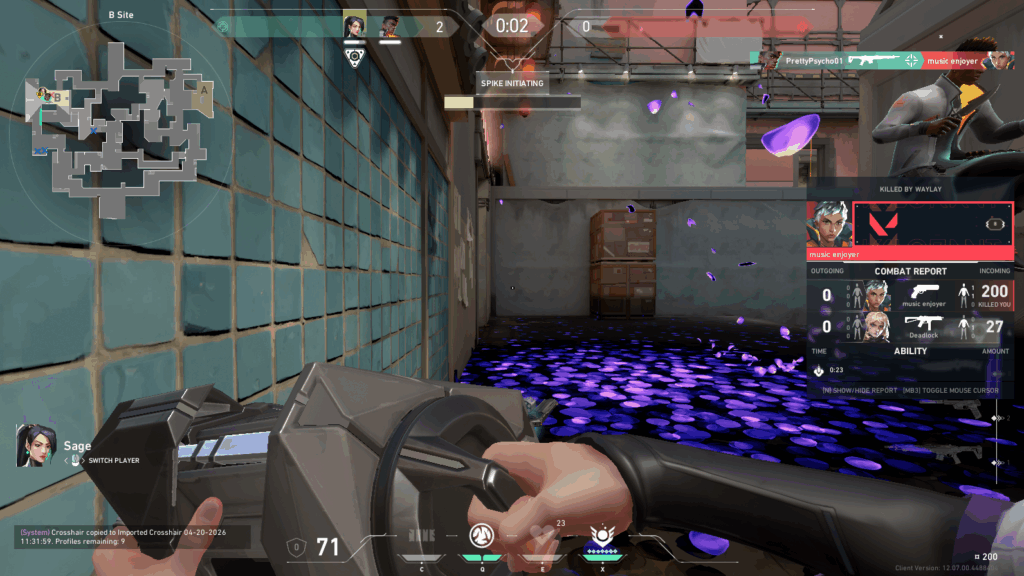
Some VALORANT players spend countless hours manually adjusting line thickness, gaps, colors, and outlines to perfect their layouts. However, that process is incredibly time-consuming, which is why many simply copy crosshairs used by friends, teammates, streamers, and pros.
Riot has made it a lot easier to import crosshair codes in VALORANT. Since Patch 5.04 (Aug. 23, 2022), you can copy setups directly from matches. You can also save up to 15 crosshair profiles, making it easy to switch between setups without losing older configurations.
How To Copy Crosshairs In VALORANT
As of April 20, 2026, there are two ways to copy crosshairs in VALORANT: (i) by importing a profile code or (ii) copying the setup of a player you are spectating in a live match.
Importing Crosshairs via Codes
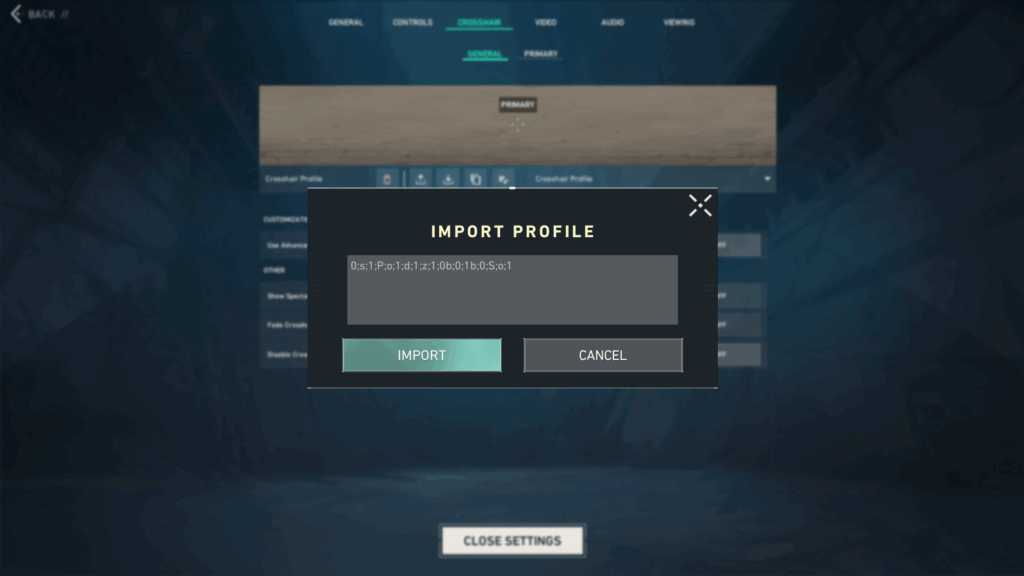
Importing crosshair codes is the easiest way to copy custom or pro setups in VALORANT. Here’s how to do it:
- Press Esc > Settings.
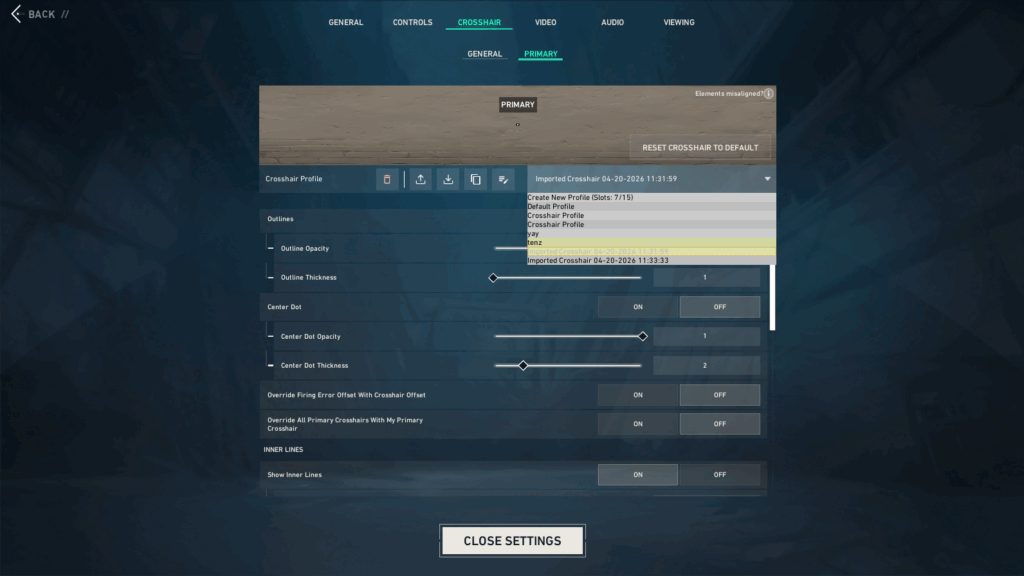
- Go to the Crosshair > General subtab.
- Click on the Import Profile Code button under the Crosshair Profile submenu.
- Paste a valid crosshair code into the input box (e.g., TenZ’s code:
0;s;1;P;c;5;o;0;f;0;0l;2;0v;2;0g;1;0o;1;0a;1;0f;0;1b;0or yay’s code:0;s;1;P;o;1;d;1;z;1;0b;0;1b;0;S;o;1). - Press the Import button (i.e., the downward arrow icon).
- The new setup will automatically be added to your saved profiles.
The import method is perfect if you already have a code you’d like to use. If not, check out our best VALORANT crosshair codes guide for popular pro and custom setups to try. Just make sure the crosshair code is complete and correctly formatted, or it won’t let you import.
Note: If you’ve reached the maximum limit of 15 profiles, you’ll have to delete older configurations before you can add more. To do this, simply select the crosshair profile you want to remove, then click the red trash icon to free up a slot.
Copying While Spectating A Player
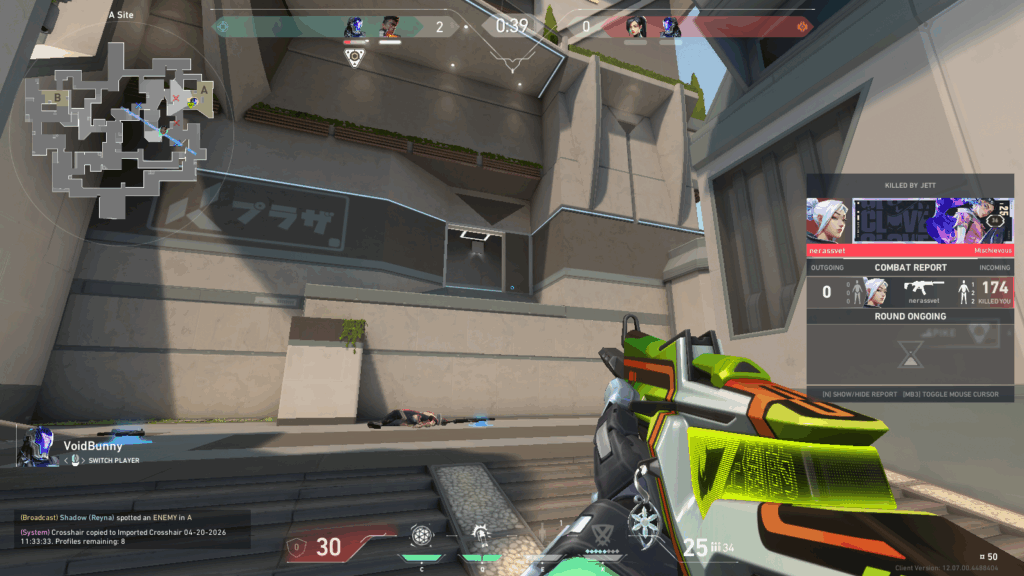
If you die mid-round or are spectating another player, you can instantly copy their crosshair and save it as a new crosshair profile without opening any menus. Just follow these steps:
- Press Enter to open the chat box.
- Type
/ccor/crosshair copyand hit Enter. - A system message reading “Crosshair copied to [Profile Name]” will appear as a confirmation.
From there, go to Settings > Crosshair to select and use, edit, or rename the copied profile. This method is ideal if you spot a crosshair performing well in matches and would like to test it.
Note: For this method to work, you must have Show Spectated Player’s Crosshair toggled on. If it’s not, you can enable it via the Settings > Crosshair menu in VALORANT. You’ll also need to have available profile slots to save it.
Troubleshooting Issues When Copying A Crosshair In VALORANT
Having trouble copying a crosshair? In most cases, it’s a simple fix. Here are some common crosshair issues encountered by VALORANT players and how to fix them:
- Crosshair code will not import: Always verify that the code you’re importing is complete and pasted exactly as provided. Even a single missing character or formatting error can prevent the code from working properly.
- Changes are not saving: Make sure you are editing the correct crosshair profile. VALORANT saves configuration changes automatically, so switching to the wrong profile is usually the issue.
- Copied crosshair cannot be found: Go to Settings > Crosshair and browse your saved profiles until you find the right one. Imported or copied setups are typically added as a new profile labeled with the date and time, making them easier to find.
- No space for new profiles: VALORANT lets you have a maximum of 15 saved crosshair profiles. If you’ve hit this limit, delete older or unused profiles by clicking the red trash icon next to each profile to free up space.
- Spectator copy command not working: Check that “Show Spectated Player’s Crosshair” is enabled in your crosshair settings before using the /cc or /crosshair copy chat commands.
VALORANT Crosshair Copying FAQ
If you still have questions about how to copy crosshairs in VALORANT, these frequently asked questions (FAQs) should clear up any remaining confusion.
How Many Crosshair Profiles Can I Save In VALORANT?
You can save up to 15 crosshair profiles in VALORANT. If you’ve reached the limit, you must delete older setups using the red trash icon alongside the profile to free up space.
Can I Copy A Crosshair From Anyone In-Game?
Yes, as long as you have access to that player’s crosshair code or can copy it through supported methods, like third-party crosshair databases (ProSettings or Tracker.gg) or via spectator mode.
What Should I Do If My Imported Crosshair Isn’t Working?
If an imported crosshair code isn’t working, double-check that you entered the code correctly. Only valid codes entered in the proper format will be imported. Even a single character mistake can make the code non-functional.
Can I Share My Crosshair With Friends?
Absolutely. You can export your crosshair code via the Settings > Crosshair menu in VALORANT. Simply click on the Export Profile Code button and send it to your friends.
How Do I Copy A Crosshair I See In Spectator Mode?
While spectating a teammate during a live match, press Enter to open the chat box. Type /cc and hit Enter again. The crosshair will instantly be copied to your saved profiles for you to use, edit, or rename later.
Always practice Responsible Gambling and check out our latest promo offers and boosts. T&Cs apply. 18+ to play.