
Deadlock’s expansive roster of unique heroes and MOBA-style gameplay has already generated tremendous hype, and the game hasn’t even hit 1.0 yet. Valve’s 6v6 hero shooter isn’t publicly available either, with access being strictly invite-only through existing playtesters.
In this guide, we’ll explain how to send and receive a Deadlock invite, plus guidance on tracking your referral status, troubleshooting delays, and requesting access if you don’t know anyone already playing.
What the Deadlock invite system means for access
Deadlock is still in early development and is not yet available to the general public.
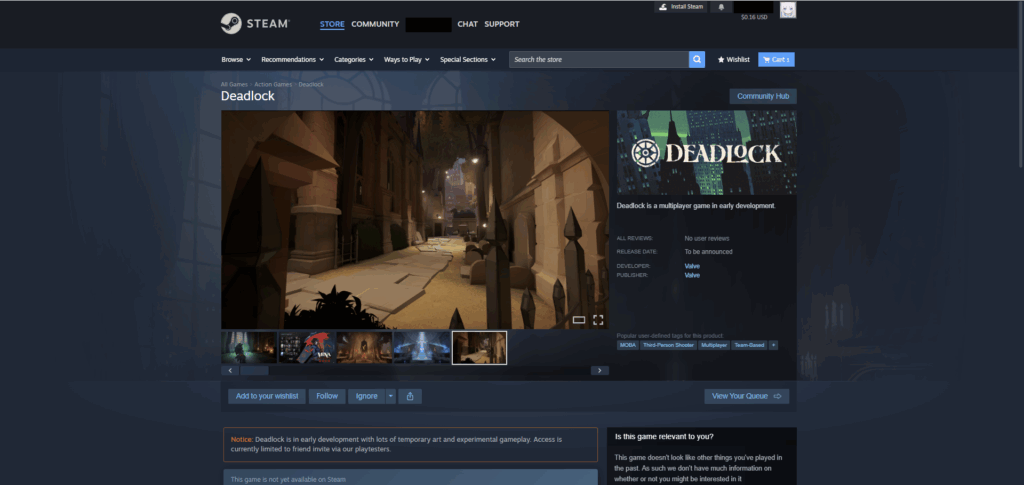
According to the Steam store page, access to Deadlock is currently limited to friend invites sent by existing playtesters. This means you’ll need somebody on your friends list who already has Deadlock in their Steam library to send you an invite before you can join the playtest.
Importantly, playtest invites don’t appear instantly. The typical delivery timeframe is around 1–2 days, but some users have reported that the process can take significantly longer. When it arrives, you should receive an email and a Steam notification prompting you to accept or reject the invitation.
If you can’t get an invite from a friend, you can either wait for Valve to expand Deadlock access on Steam or request an invitation through a reputable community. That said, we suggest you rely on existing friends for invites, as adding random strangers could expose you to scammers.
ft. Valve
How to send a Deadlock invite to friends (in-game workflow)
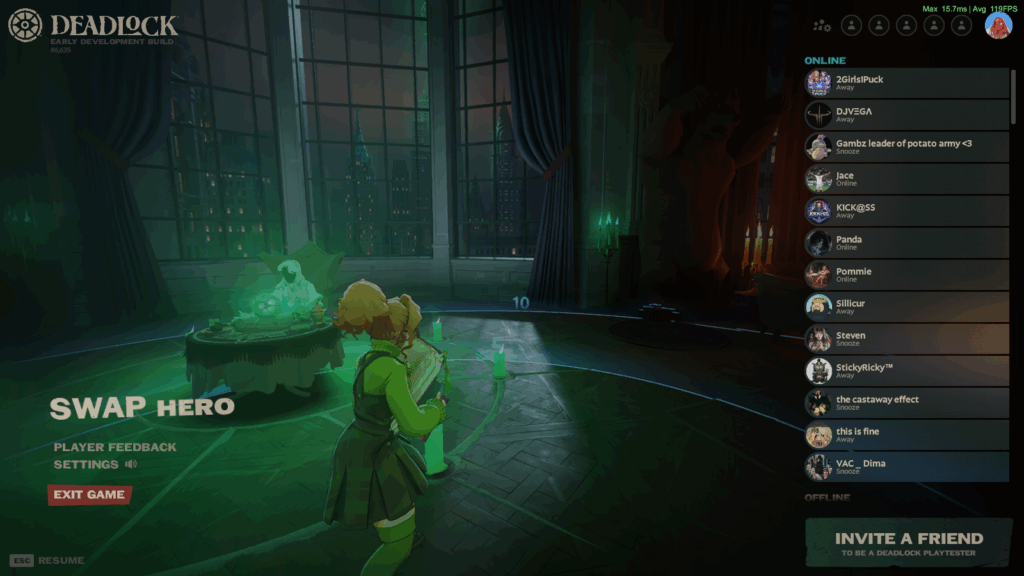
It’s important to note that only existing Deadlock playtesters can invite other players. Here’s how to do it:
- Launch Deadlock on Steam.
- Press Esc from the home screen.
- Click on Invite a friend in the bottom-right corner.
- Select a player from the Can Invite category.
- Press the green Invite button to send them an invitation.
Once the invite has been submitted, you should see a pop-up message reading “Successfully submitted” as confirmation. After that, you can instruct the recipient to monitor their email and Steam account for a notification.
ft. Valve, Deadlock
Deadlock invites are processed through Steam and are usually delivered within 1–2 days. In the case of delays, avoid repeatedly sending invitations or asking other players to invite the same account while the original request is still pending, as it might lead to further delays in processing.
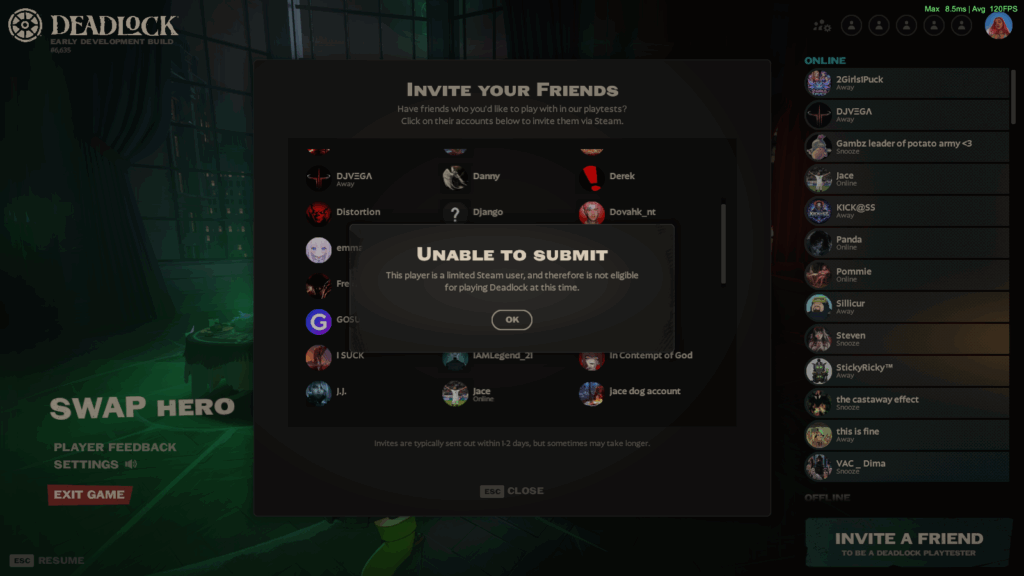
If you encounter an “unable to submit” error message, it might be that the player either (i) already has access, (ii) has a pending invitation from somebody else, or (iii) does not meet the eligibility requirements. For example, limited Steam accounts are ineligible to join the Deadlock playtest.
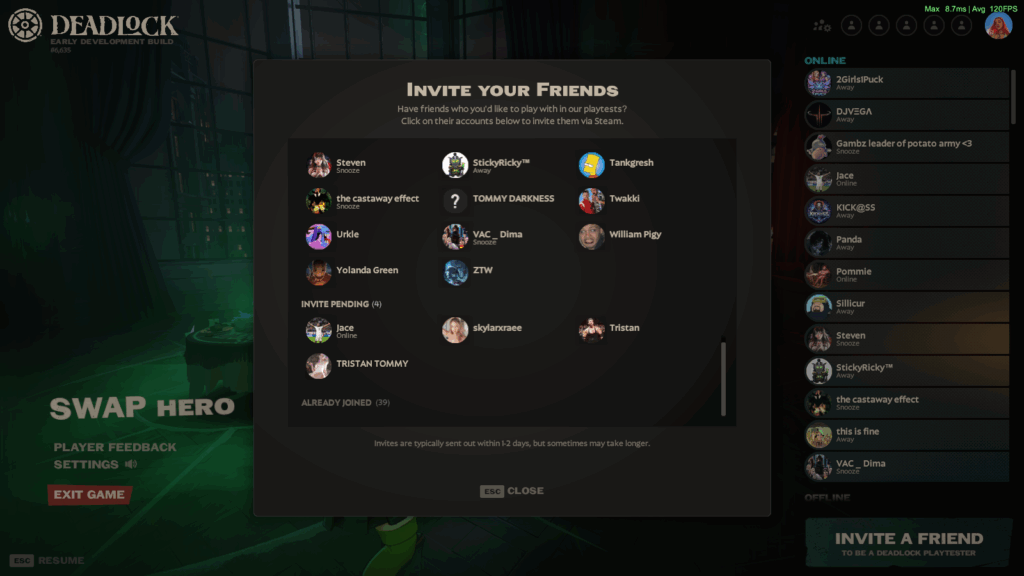
You can review the status of Deadlock invites directly through the invite menu. The labels include:
- Can Invite: The player is eligible to receive an invitation.
- Invite Pending: An invitation has already been submitted for the player.
- Already Joined: The player already has access to Deadlock.
Note: You can only invite players who are already on your Steam friends list. There also does not appear to be any published invitation limit.
ft. Valve, Deadlock
How to check if you received a Deadlock playtest invite
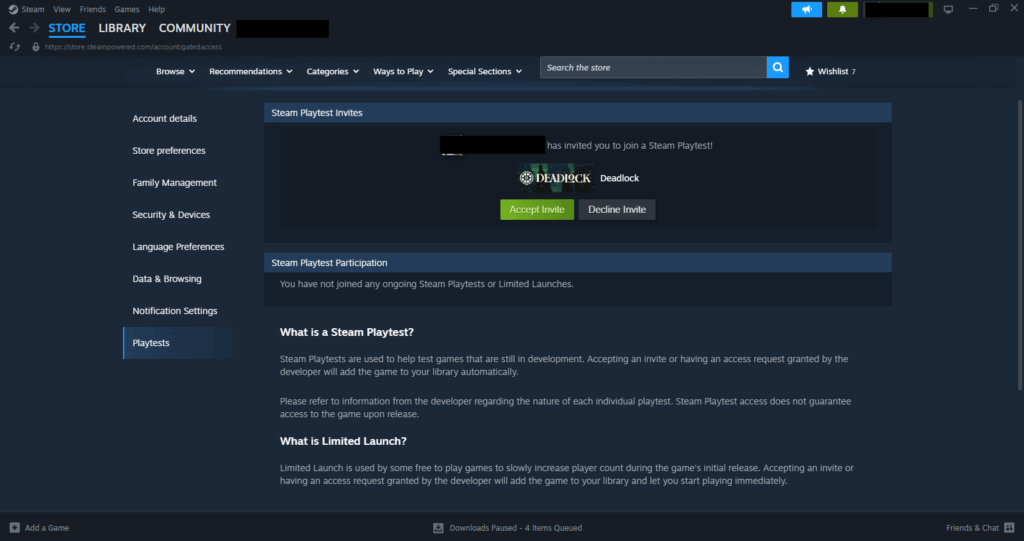
The fastest and most reliable way to check if you’ve received a Deadlock playtest invite is through the Playtest Invites or Gated Access pages on Steam. To do this, simply:
- Log into your Steam account via the client or web browser.
- Click on your avatar in the top-right corner.
- Go to Account Details > Playtests.
Any pending invites will appear under “Steam Playtest Invites.” You will be notified via the Steam client and by email (from [email protected]). However, these notifications are often missed or stuck in limbo, in which case the Playtest Invites page is your most reliable option.
If you can see Deadlock, click on “Accept Invite” to join the playtest. Accepting the invite will automatically add the game to your Steam library. If not, proceed with the troubleshooting steps in the next section.
Deadlock invite not received: troubleshooting and timelines
Typical Delays and Expectations
Deadlock invites are not delivered immediately, so you can expect delays.
In most cases, invites take 1–2 days to process, though there have been reports where players have waited weeks or even months for invites to arrive. For this reason, let a few days pass before assuming there’s an issue.
Where to Verify Your Invite
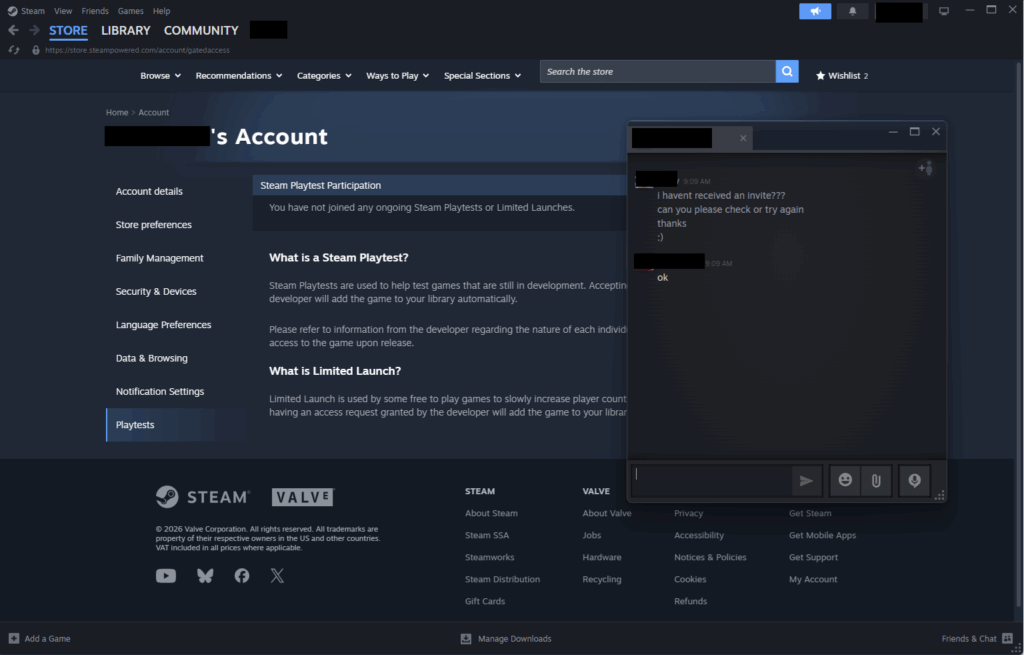
If you haven’t received your invitation, sign in to the Steam account that was invited and check the Playtest Invites page.
This page displays all playtest referrals associated with your Steam account, including any that may not have triggered a notification. Always check here before contacting the sender or assuming the invite was never sent.
ft. Valve
Email and Delivery Issues
Deadlock invitations are delivered through Steam and email, but the email notification could be delayed, marked as spam, or missed entirely.
In that case, be sure to check your email inbox and spam or junk mail folders connected to your Steam account. Also, confirm that you’re signed into the right Steam account and double-check that there aren’t any pending invitations on the Playtest Invites page.
If the invitation still isn’t showing up, politely ask the sender to check your status in the Deadlock invite menu.
- If it says Invite Pending, the request was successfully sent and might still be processing.
- If it says Can Invite, the sender (or someone else) can try sending the invite again.
ft. Valve, Deadlock
Community invite sources and etiquette for Deadlock
If nobody on your Steam friends list has Deadlock, you can request an invitation from members of reputable communities.
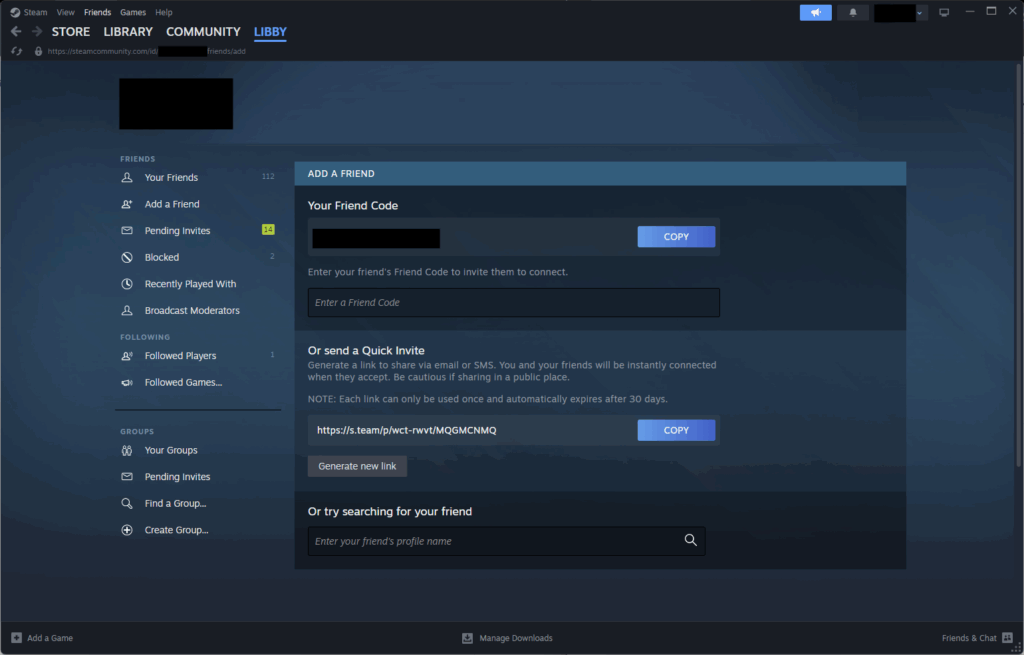
The r/DeadlockTheGame page is one such community with a dedicated megathread for requesting invites. You can also make requests through its affiliated Deadlock Community Discord server. In both cases, you must post a comment with your Steam friend code or a link to your Steam profile so an inviter can add you.
Here’s how to find your Steam friend code:
- Launch Steam.
- Open your Friends list.
- Click on the Add a friend icon.
- Copy your friend code at the top of the page.
You’ll then have to wait for the inviter to add you to their Steam friends list and accept your friend request. Some members respond within minutes, while others take hours or days to reply, depending on their availability. Once you have received an invitation, you can unfriend the person who invited you.
Do not share any personal or financial information (e.g., passwords, credit card details) or click any suspicious login links sent in the Discord or Steam chat. If you happen to encounter bad actors, report them immediately using Steam’s reporting tools.
ft. Valve
You can invite other players to join the playtest once Deadlock is added to your Steam library. Just remember that adding random friends on Steam may expose you to scams, so it’s best to rely on an existing friend you trust for invites or take the necessary precautions when adding strangers.
Importantly, Deadlock invitations are free and are delivered through Steam. You should not pay somebody or request payment for an invite. According to the r/DeadlockTheGame megathread, if you are banned for cheating, everyone you invited may also be banned. They can appeal manually, but Valve is not required to restore their access.
Deadlock playtest hours and switching regions
Playtest hours by region
There are currently no time restrictions on the Deadlock playtest.
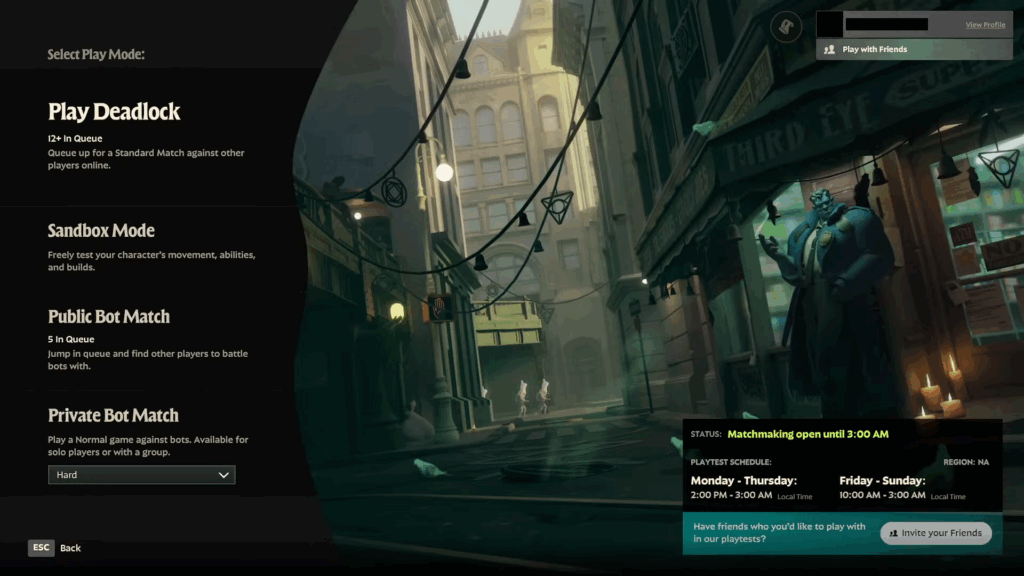
Deadlock originally limited matchmaking to specific hours that differed by region. However, Valve lifted the restrictions in the Sep. 12, 2024 update, making matchmaking available “24/7 for all regions.”
In the past, Deadlock was restricted to the following playtest hours:
| Region | Monday – Thursday | Friday – Sunday |
| North America | 5 PM – 6 AM ET | 1 PM – 6 AM ET |
| South America | 4 PM – 4 AM BRT | 12 PM – 4 AM BRT |
| Europe | 3 PM – 3 AM CET | 11 AM – 4 AM CET |
| Asia | 4 PM – 4 AM JST | 12 PM – 4 AM JST |
| Oceania | 2 PM – 2 AM AEST | 10 AM – 2 AM AEST |
Switching regions with the region override
Deadlock does not currently offer a reliable manual server region selector.
The citadel_region_override command previously let players manually change their server region through the developer console, mainly to reduce queue times or play with friends in different regions. However, the command is deprecated and no longer changes your matchmaking region.
Here’s how you could access it:
- Launch Deadlock.
- Press F7 to open the developer console.
- Enter citadel_region_override followed by the number for your preferred server:
- -1 for Automatic (default; recommended for the best connection and queue times)
- 0 for North America
- 1 for Europe
- 2 for Asia
- 3 for South America
- 5 for Oceania
ft. Valve, Deadlock
NDA status and streaming rights for Deadlock playtests
Deadlock is not subject to a non-disclosure agreement (NDA).
Deadlock was originally released to playtesters under a strict NDA, but the restrictions were removed on Aug. 23, 2024. Now, players can freely stream gameplay, create videos, run community websites, and publicly discuss their playtest experiences.
That said, Deadlock remains in early development with access limited to invites from existing playtesters.
Account signup: fields and terms you’ll see before playing
You do not need to create a separate Deadlock account or complete any signup form to play Deadlock.
After being invited to play Deadlock, you will receive an email or notification directing you to the Playtest Invites page to accept or reject the invitation. If you accept the invite, Deadlock will be automatically added to your Steam library, allowing you to download and participate in the playtest.
After your Deadlock invite arrives: quick UI tips and first steps
Once Deadlock is installed, go to Learn to Play for a tutorial on the basic mechanics. This includes riding the zipline, movement and combat controls, using abilities, buying items, and taking objectives, all fundamental concepts for new players.
You can also play a 4v4 Street Brawl match against bots or enter Sandbox Mode to test out hero abilities, movement mechanics, and items without the pressure of a live match. For more practice, go to The Atrium or use the Explore NYC mode to familiarize yourself with the map and learn important routes.
Over time, you’ll play standard matches against other players. You’ll start at the Initiate rank, but as you build experience and improve, you’ll gradually move higher through the Deadlock ranks.
ft. Valve, Deadlock
What Deadlock is: quick context for invitees
Core gameplay snapshot
Deadlock is a 6v6 third-person hero shooter game from Valve, combining fast-paced gunplay with traditional multiplayer online battle arena mechanics. Most matches last 30–45 minutes and involve teams guiding waves of troopers through three lanes, destroying structures, and defeating the enemy team’s patron.
Along the way, players collect Souls by killing enemy heroes, last-hitting troopers, clearing neutral jungle camps, destroying Guardians and Walkers, delivering the Urn, or securing the Unstable Rift. Souls can later be spent on items at the Curiosity Shop to upgrade weapons and abilities or improve survivability.
System requirements (minimum and recommended)
Valve has not yet announced Deadlock’s official minimum or recommended system requirements.
Here are the unofficial estimated specs for playing Deadlock on PC:
| Minimum requirements | Recommended requirements | |
| OS | Windows 10 64-bit | Windows 10 or 11 64-bit |
| CPU | Intel Core i5-7500 orAMD Ryzen 3 1200 | Intel Core i5-11400 orAMD Ryzen 5 5600 |
| GPU | NVIDIA GTX 1060 6GB orAMD RX 580 | NVIDIA RTX 3060 orAMD RX 6600 XT |
| RAM | 8 GB | 16 GB |
| Storage | 30 GB SSD | 30 GB NVMe SSD |
Future access updates and expected timelines
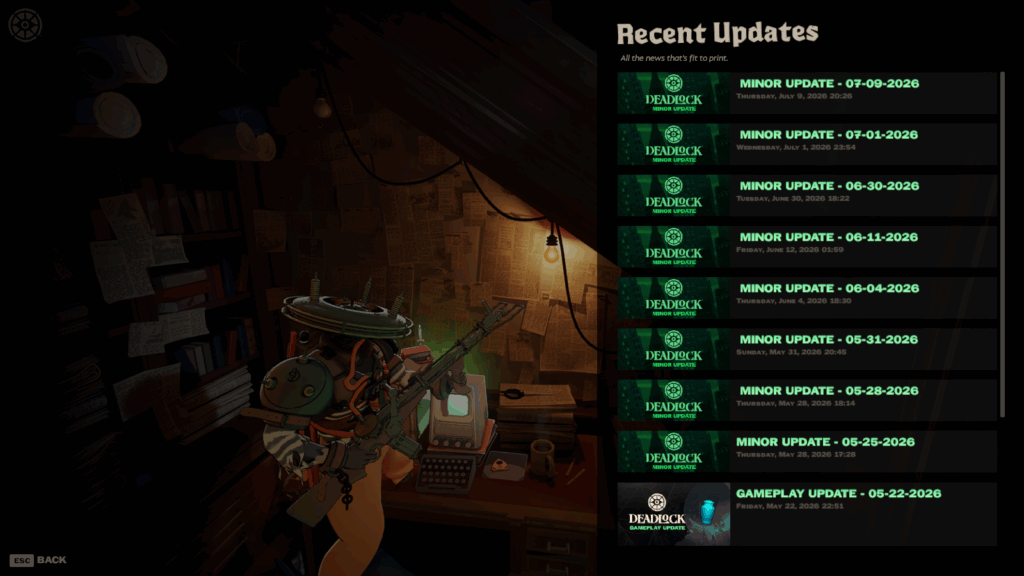
As of July 17, 2026, Valve has not confirmed a release date for Deadlock.
The Steam store page still lists Deadlock as being “early development with lots of temporary art and experimental gameplay.” Valve is expected to expand access beyond friend invites through an open beta or early access release, but no official roadmap currently exists to confirm either.
If you’re interested in playing Deadlock, you can add the game to your Steam wishlist to receive updates from the developers.
ft. Valve, Deadlock
Deadlock Invite FAQ
Still confused about something? Here are some frequently asked questions (FAQs) about Deadlock invites.
What is the Deadlock invitation model right now?
Deadlock is currently in early development, with access granted exclusively by invitation from existing playtesters.
How long do Deadlock invites take to arrive?
Deadlock invites typically take 1–2 days to deliver, but some take considerably longer.
How do I invite a friend to Deadlock?
Invites are sent directly through the Deadlock game client. Press Esc from the home screen and then click on “Invite a friend.” Next, select a player from your Steam friends list and press the green “Invite” button to send an invitation.
What do the invite statuses mean?
There are three status labels: “Can Invite” means the player is eligible for invitation, “Invite Pending” means a request has already been submitted, and “Already Joined” means the player already has access to Deadlock.
Where do I check my Deadlock playtest invite status?
You can check your Deadlock invite status on the Playtest Invites or Gated Access pages. These are located under the Account Details > Playtests menu in your Steam account settings.
My invite didn’t arrive. What should I do?
You should wait a few days for the invite to arrive, check your spam or junk mail folders, or review the Playtest Invites page on Steam. If that doesn’t work, ask the sender to check your status in the Deadlock invite menu and (if necessary) to send another invitation.
I don’t know anyone with access. Can I still get invited?
Yes. You can request an invitation from somebody through a reputable Deadlock Discord server, subreddit megathread, or another trusted community.
Are there risks when seeking invites online?
Yes. Adding strangers could expose you to scams, phishing links, or fake “paid” invite offers. You should never share any personal information or click on any suspicious links.
Can I stream or post about Deadlock?
Absolutely. Deadlock playtesters are free to stream games, create videos, run community pages, or discuss their in-game experience.
Can I switch play regions?
No. It is not possible to manually select your server region in Deadlock.
What are the Deadlock system requirements?
Valve has not yet published Deadlock’s official minimum and recommended system requirements.
Always practice Responsible Gambling and check out our latest promo offers and boosts. T&Cs apply. 18+ to play.
