

Have you ever watched your team’s Nexus blow up on Summoner’s Rift for the third match in a row and wondered, “How Much Have I Spent On League of Legends?” It’s only natural to think about when you consider that Riot Games’ MOBA has been around since 2009. So if you’re curious about how much you’ve spent but haven’t kept meticulous records, don’t worry; we can help. The game is free to play, but that doesn’t mean you’re not able to spend some hard earned cash.
Let’s jump in and discuss how to check your purchase history in League of Legends (LoL), why you would want to do it, and how refunds work.
How To Check How Much You’ve Spent On League
There are two primary ways to check how much money you’ve spent on LoL. The only caveat is that both these methods provide details of one account at a time. If you have multiple League of Legends accounts, you just need to complete the process again and add the totals together.
While Riot has an official support page for account spending, that same page has been “under construction” since March 2023. That’s why we put together the methods below, allowing you to check your purchase history using the premium Riot Points (RP) currency and real money.
In-Game LoL Purchase History
First, make sure your game is updated to the latest version via the Riot Client. Then just launch LoL and follow the steps below to check your purchase history via the in-game store.
- Click on the Store (money icon).
- Select the account option to the right of Purchase RP and Gifts.
- Select the Purchase History option from the menu on the left-hand side. This option is for purchases made with RP.
- Alternatively, click the RP Purchase History button to check real money spent on RP in LoL.

Personal Data Request Ticket
The second option to check how much you’ve spent doesn’t require you to launch the game. It’s also easy to do on mobile devices. Follow the steps below to see how much you spent on League and other Riot titles via a support ticket.
- Visit the LoL Support Ticket creation page.
- Log in with the Riot account you use to play LoL.
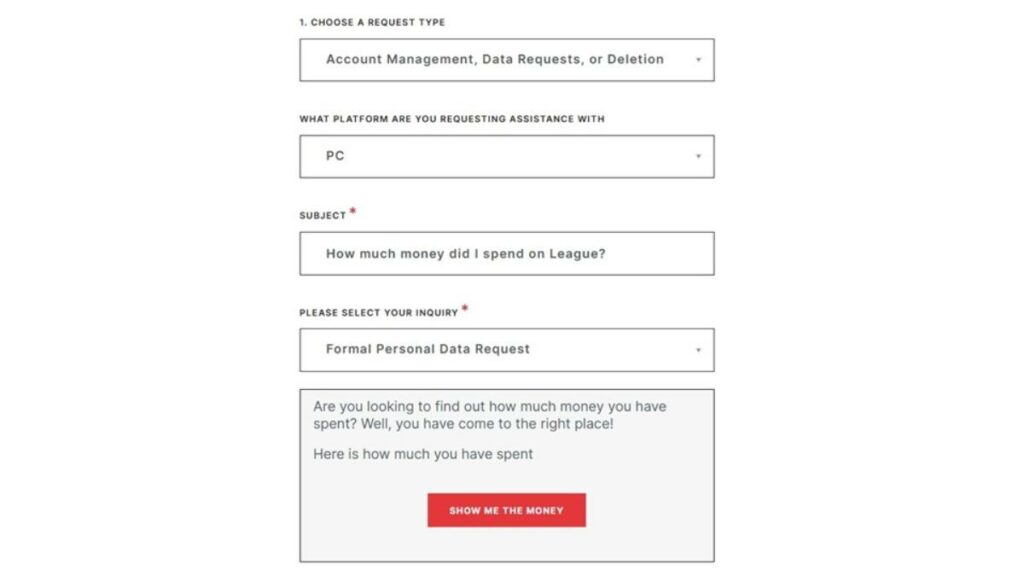
- Select the “Account Management, Data Request or Deletion” request type option from the first drop-down menu.
- Select your platform (PC for LoL). Under the subject line, type in “How much money did I spend on League?” or anything similar to indicate you’re looking for a total amount.
- Under the first “Please Select Your Inquiry” option, choose “Formal Personal Data Request” from the drop-down menu.
- Under the second “Please Select Your Inquiry,” choose the option “I want to know how much money I’ve spent with Riot Games.”
- A red “SHOW ME THE MONEY” button will pop up. Click on it.
Please note: This does not include third-party transactions or gifts.
Why You Should Check How Much You Have Spent On League
Here are some common reasons LoL players want to check their purchase histories.
Setting Personal Limits
Just like in LoL esports betting (or any form of gambling), the best winners know when to stop. That statement also rings true when purchasing items in LoL. It’s always good to set a budget and enforce your own strict spending limits. Knowing how much you’ve spent on LoL is imperative when setting personal boundaries.
Fraud Detection
Monitoring your account spending history lets you promptly notice unauthorized purchases, allowing you to minimize loss and maximize recovery efforts.
Bookkeeping
With a purchase history, bookkeeping is much easier. While most individual gamers won’t require much bookkeeping, organizations with compensation policies for workers who spend money on microtransactions will use a LoL item purchase record. For example, a video game journalist may buy RP to unlock a Champion for research purposes, and the publication reimburses them for the purchase.
Refund Eligibility Data
Checking your purchase history will help you determine which items are eligible for a refund. For reference, the content must have been purchased within the past 14 days. And if you want to use a Refund Token (more on this later), the content purchase date must fall between the 14- and 90-day window.
Does Riot Provide Refunds For League Purchases?
The short answer is yes, Riot can provide refunds for LoL purchases. However, there are some caveats, and you won’t be able to request a refund for every type of purchase. According to the official League of Legends support page, unless “any applicable laws require otherwise,” LoL players can only get refunds on content that meets the following criteria:
- The content must be unused.
- The content was purchased no more than 14 days ago.
The following content is refundable via the in-game LoL store if it meets the above requirements.
- Champions
- Emotes
- Individual Chromas
- Skins
- Ward skins
You must submit a ticket to Riot support to get a refund on the following item purchases:
- Chroma packs
- Rune pages
- Summoner icons
- Summoner name changes
You can only get a Name Change refund if your previous name is still available.
What Is Not Eligible For A Refund?
Per Riot, the following items are non-refundable:
- Account transfers
- Boosts
- Bundles
- Chests
- Earned content, including Blue Essence
- Event passes
- Gifts
- Hextech chests, keys, and shards
- Promotional items
What Are LoL Refund Tokens?
Refund Tokens are another way to request a refund for LoL purchases. You’ll only need to use these when a standard refund request fails. You can use Refund Tokens to request an RP refund for unused, eligible content between 14 and 90 days from the purchase date.
Each Riot account starts with three Refund Tokens already loaded. There are no refunds for Refund Tokens. Each LoL account gets one Refund Token per year, but only if it has fewer than three.
Can I Get A Real Money Refund?
Yes, you can get a refund for a purchase made with real money. If you purchase RP, for example, you can get a refund if you haven’t spent any of it. You can also get a refund for any “unused refundable content” if a request is made within the first 14 days after purchase. That said, you must submit a ticket to request a real money refund.
Riot may update its policies over time, so if you have any further queries, we recommend checking out the comprehensive LoL Refund Policy support page.
And in case you missed it, be sure to check out our guides on how to find your total spending history in VALORANT and how much time you’ve spent in LoL.
Always practice Responsible Gambling and check out our latest promo offers and boosts. T&Cs apply. 18+ to play.