
To reach the peak of your potential as a Counter-Strike 2 (CS2) player, you’ll want to use the perfect crosshair to complement your playstyle. For many gamers, including some pros, that’s the CS2 dot crosshair setup.
Let’s discuss how you can get a dot crosshair in CS2, including the different options available. From crosshair codes to make the setup lightning fast, how to perform some testing, and a FAQ section, we’ve got you covered.
Steps To Set Up The Best CS2 Dot Crosshair
You don’t have to dive into console commands or config setups to get a dot crosshair working in CS2. It’s an easy process straight from the in-game settings menu.
To start setting up a basic dot crosshair with medium thickness, a green color scheme, and a medium black outline, follow the steps below.
- Run Steam, ensure the game is up to date, and launch CS2.
- Navigate to the settings menu (gear icon).
- Select “Game” followed by “Crosshair” to see all the available options.
- Choose “Classic Static” from the crosshair style options.
- Select “No” next to “Follow Recoil.”
- Select “Yes” next to “Center Dot.”
- Drag the Length bar all the way to 0.
- Add a Thickness of 1.5 (size of your dot).
- Add a Gap of -3.0 (position of the outline).
- Tick the Outline box and set its value to 2.0.
- Tick the Alpha box and set its value to 200 (transparency meter).
- Set your color. For green, set the green component to 255, while both blue and red components are at 0.
With the settings entered, you can simply start a game and test out your new CS2 dot crosshair in action. As you adjust these settings, you’ll notice a graphic at the top of the crosshair settings changes dynamically, so you’ll always see precisely what type of effect a setting has. Thanks, Valve!
For those who just love using console commands, we’ve listed the exact commands to enter below.
cl_crosshairstyle 4; cl_crosshairdot 1; cl_crosshairthickness 1.5; cl_crosshairgap -3.0; cl_crosshairsize 0; cl_crosshaircolor 1; cl_crosshairusealpha 1; cl_crosshairalpha 200; cl_crosshair_drawoutline 0; cl_crosshair_outlinethickness 0In case you’ve missed it, we’ve got a complete list of CS2 console commands to play around with.
Best CS2 Dot Crosshair Codes
Our preferred dot crosshair setup features a thick black outline and a cyan color scheme. Check out its code below.
CSGO-tbOAJ-ZVJRj-GDY3e-tpriJ-hVaUN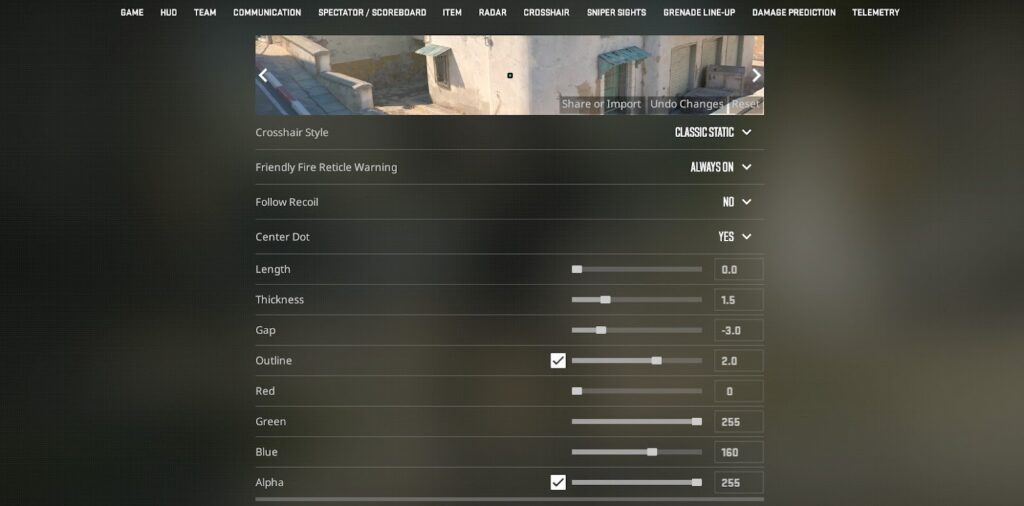
You’ll find five more dot crosshair codes to test in CS2, which we think players should try before settling on a specific one.
- CSGO-kYLuD-ahMFC-YBTie-MRkrV-nKbEC (green box dot crosshair, no outline)
- CSGO-JaaMN-QODox-vueWF-sdtLn-PU9vO (green circle dot crosshair with thin outline)
- CSGO-PKWyV-5oamM-nMF2Q-wQZzG-UTOAK (tiny dot crosshair with cyan color, used by American entry fragger, Jonathan “EliGE” Jablonowski.)
- CSGO-YvE2k-fZyMM-jYODT-7ZUyW-o2OtQ (Thick blue dot with no outline)
- CSGO-QVJA3-eFyR4-wjv9e-x3tNO-DqmHB (tiny yellow dot with thin outline, used by TWC 2025 champion, Danil “molodoy” Golubenko)
When searching for the best dot crosshair setup in CS2, a critical step is testing different options.
How To Test CS2 Dot Crosshairs For A Perfect Fit
There are many crosshair options in CS2, including thickness and color, that players can test. Not everyone will have the same preference. Some may prefer orange over green, for example.
That’s why we recommend trying various options to find the perfect fit. You shouldn’t test a new crosshair in high-stress CS2 game modes such as Competitive or Premier Mode, because playing with a new crosshair for the first time could lead to poor performance and salty teammates.
We recommend selecting the Deathmatch game mode in the “Practice” tab to play against bots, or Arms Race for a quick switch between various guns.
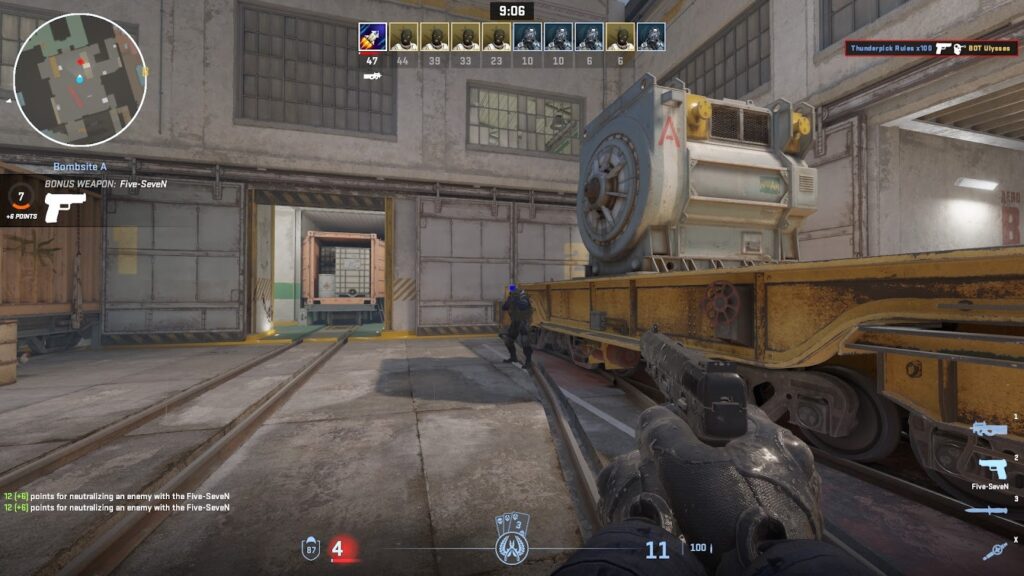
You could also download and play on Custom Maps, specifically designed for aim training. While you are at it, check out our guide to improving your aim in CS2, which includes training techniques for beginners and experts alike.
Alternative CS2 Crosshairs & Settings
There are many different CS2 crosshair options, each with its own values and settings. Check out our guide to the best CS2 crosshair settings, and browse the best crosshair codes to use.
For quick reference, we’ve gathered together the crosshair codes (thanks, prosettings.net) used by pros on our top 10 CS2 players of 2025 list.
- Maksim “kyousuke” Lukin – CSGO-4ttyQ-vfwMK-Gz9fL-hY6zW-4fWjM
- İsmailcan “XANTARES” Dörtkardeş – CSGO-xbpe2-E24RJ-YXNuO-pQvt8-ppNAK
- Danil “molodoy” Golubenko – CSGO-QVJA3-eFyR4-wjv9e-x3tNO-DqmHB
- David “frozen” Čerňanský – CSGO-J76WS-DiJ5B-BeD2T-afhqm-xKn2H
- Dmitriy “sh1ro” Sokolov – CSGO-RkRqq-jiVoN-YXauZ-CWzQV-mUeuB
- Kaike “KSCERATO” Cerato – CSGO-ufZUO-V27Te-WQRmC-LhG9C-6AU8N
- Ilya “m0NESY” Osipov – CSGO-wAD3c-ykt5L-zvZ98-vBisR-6sWPA
- Danil “donk” Kryshkovets – CSGO-NmcdV-ORLFj-vKC4W-LV6zW-4fWjM
- Robin “ropz” Kool – CSGO-MMQuh-Hs3Sj-Qv9zd-VaCmc-3QqNO
- Mathieu “ZywOo” Herbaut – CSGO-pXyqy-zfCch-UyhyY-695qx-ZRivN
There’s no limit to how many crosshair adjustments you can make, so go wild!
FAQs About Dot Crosshairs In CS2
To ensure you have all the information you need, we’ve answered some frequently asked questions about dot crosshairs in CS2.
What Is The Best Dot Crosshair Color In CS2?
While green is generally considered the best crosshair color, it ultimately comes down to preference. Pros like Danil “donk” Kryshkovets, Robin “ropz” Kool, and Mathieu “ZywOo” Herbaut use green, while others prefer cyan or yellow.
Which Pros Use The Dot Crosshair In CS2?
Many pros do or have used the dot crosshair setup. A prime example is the legendary American entry fragger, Jonathan “EliGE” Jablonowski, who uses the dot crosshair with a cyan color scheme. Another example is the GOAT of CS:GO, Oleksandr “s1mple” Kostyliev, who has previously used a dot crosshair.
How To Get Cyan Crosshair Color In CS2?
Navigate to the in-game Settings menu, select the “Game” tab, followed by the “Crosshair” tab. Scroll down slightly. Set the green value to 255, the blue value to 160, and the red value to 0 to get the cyan crosshair color.
What Is The Biggest Advantage Of A Dot Crosshair?
With no thin crosshair lines or moving parts, the dot crosshair provides the most distraction-free view of the virtual battlefield. While crosshair lines can create confusion about where bullets will hit between the gaps, a solid dot pinpoints the precise location.
What Is The Biggest Disadvantage Of A Dot Crosshair?
Crosshair lines, which are not present when using a dot in CS2, provide visual feedback for bullet spread and recoil.
Always practice Responsible Gambling and check out our latest promo offers and boosts. T&Cs apply. 18+ to play.